

WhatsApp WhatsApp Business
|
Instagram Instagram

Your customers served 24/7
AI works, you decide

Darto handles your business's customer service and only contacts you when you need to step in. Smart, customizable, and it connects to your management system.

Up and running in minutes
No tech skills needed
Set it up yourself
iOS
Android

Available on iOS and Android
Web version coming soon

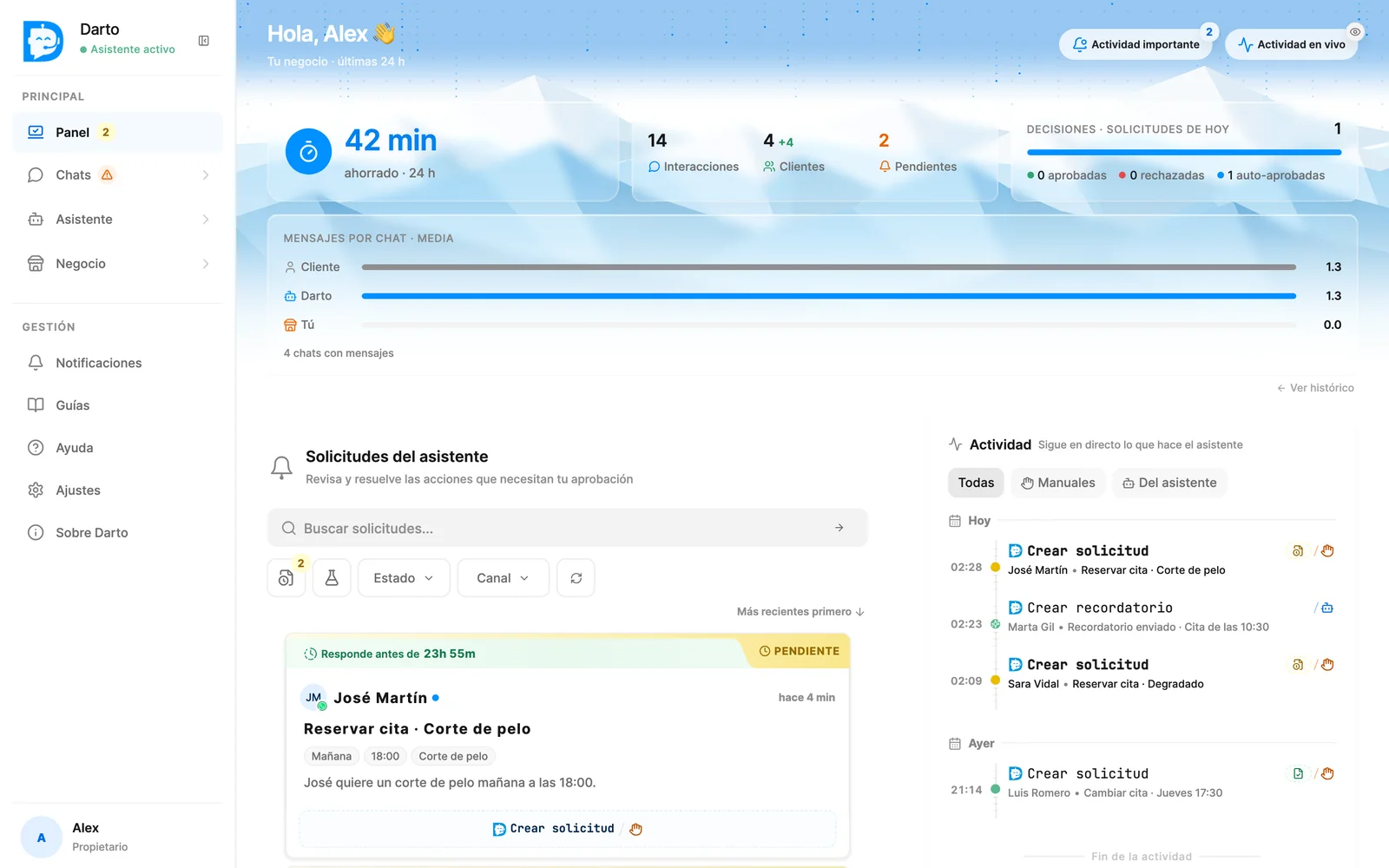
Dashboard
Dashboard
Asistente
Chats
Veredicto
Flujos y herramientas
Editor

Control.

You're at the wheel, always. Nothing important happens without your OK.

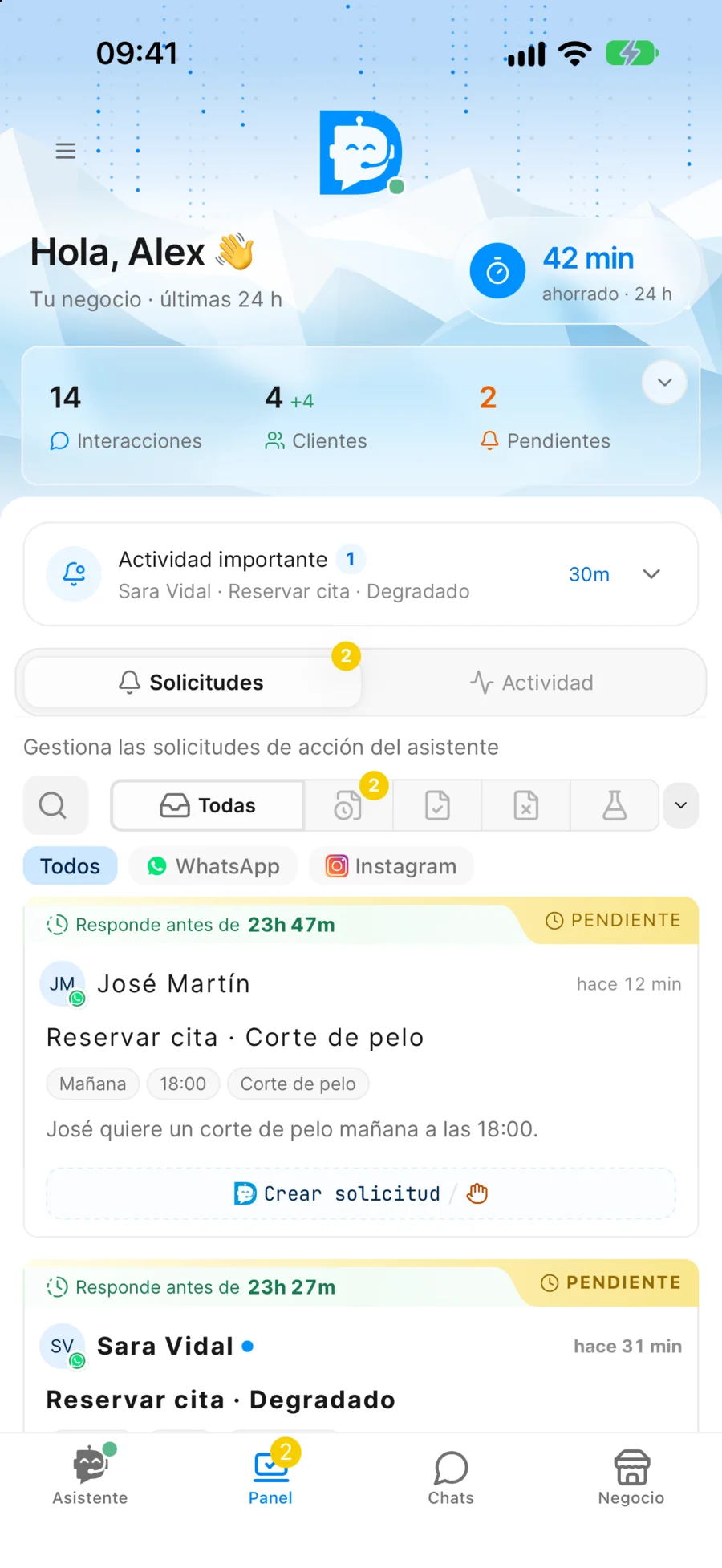
Requests

The assistant contacts you when action is needed.

When it's time to take an important step — something you have to do, or something the assistant needs your permission for — you get a request.

Clear summary, not endless chat. Customer, what they want, when — all in one card.

You or the assistant. You execute it in your system, or the assistant handles it with your OK — depending on the case.

You at the wheel, always. Nothing important happens without your permission. Zero surprises.

Are there actions you fully trust?

You can configure the assistant to execute them on its own, without contacting you every time. You decide which ones.

* Only for Automated

↓ Try it: approve or reject

Pending
2 min ago
J
Jose
+34 600 123 456

Book appointment - Haircut

The client has requested an appointment for a haircut. Regular customer, prefers Luis if available.

ServiceHaircut
DateTomorrow
Time18:00
Book appointment
Darto App
CR
Carlos Ruiz
Assistant active
Hi, I want to cancel my Thursday appointment
Hi Carlos, I see your Thursday appointment at 5:00 PM. Do you confirm the cancellation?
Yes, please cancel it

Pause and take control whenever you want

At any moment you can take control of the conversation and reply manually from Darto's built-in chat.

Pause per client or globally. Pause the assistant for one conversation, or for every client at once.

Automatic handoff to a human. If the assistant detects the customer needs a human, it pauses on its own and lets you know.

Smooth transition. Turn the assistant back on whenever you want — it resumes the conversation with the full context.

The assistant knows when to hand off to you.

If it detects the customer needs a human — frustration, complex cases, explicit requests — it pauses on its own and lets you know so you can take over.

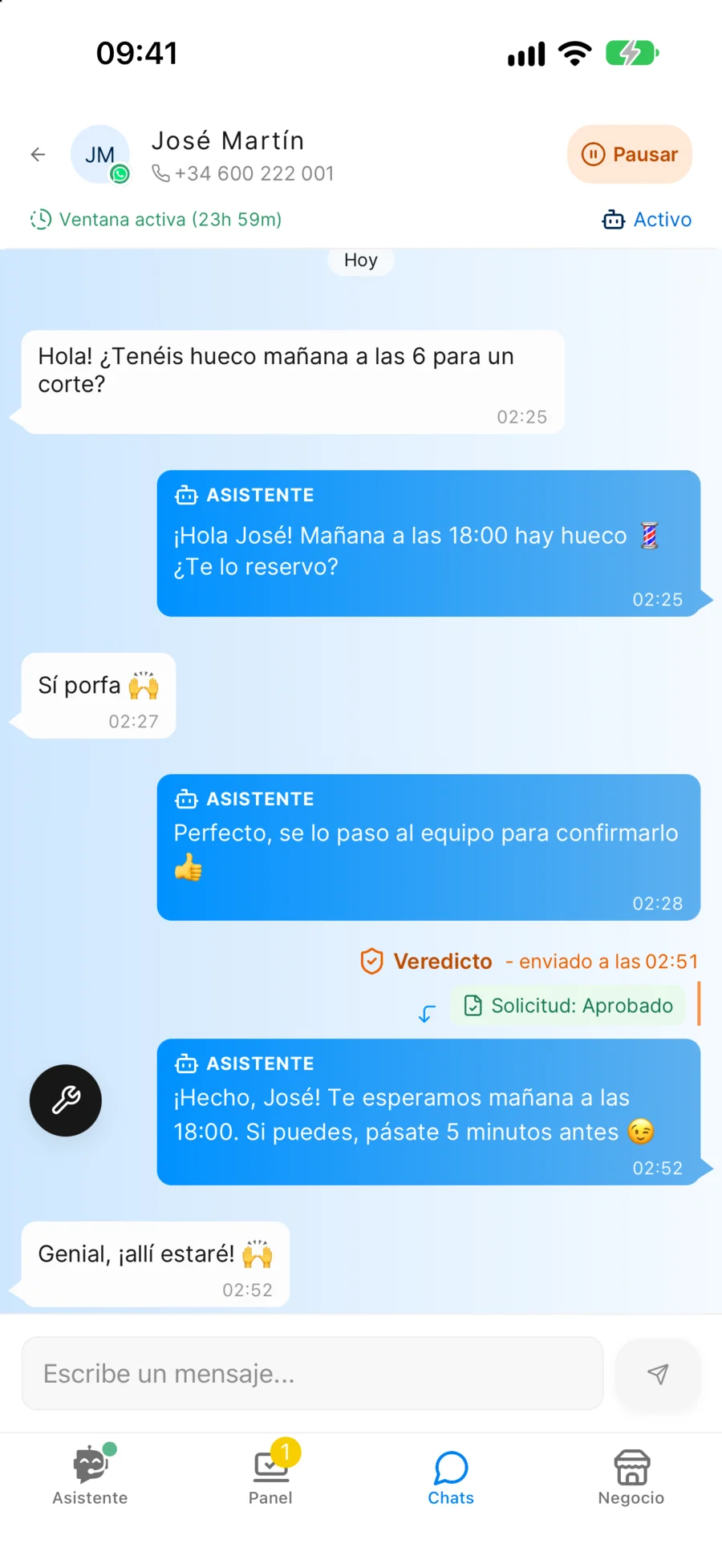
Converse.

An assistant that understands your customers — doesn't reply with templates.

Not a bot that says "sorry, I didn't understand"

No rigid or predefined responses. Real conversation: understands context, adapts each response, and speaks like a human.

Interprets colloquial language, slang and abbreviations

Remembers each customer and their preferences

Adapts the tone according to each message's context

💇
Bella Hair Salon
online
Hey, do you have any slots tomorrow at 6?
Yes, tomorrow at 6 there's availability. Would it be for a haircut as usual?
Yes! I have a date 😊
Great! I'll make sure you look perfect for tomorrow. I've sent the booking request, I'll confirm shortly 👍
Colloquial language
Per-client memory
Talks like a human

Manage the conversation intelligently

By default, the assistant manages the conversation freely. Uses tools when needed, and follows flows for situations that require it.

Tools

The assistant has tools at its disposal. It uses them when needed, without the client noticing.

Queries: Get information. Always automatic.

Actions: Execute changes. Manual or automatic.

Flows

For certain situations, you can define scripts that the assistant follows obligatorily.

Escalate to humanHandle complaintsGroup booking

Approve in seconds, not minutes

When an action is manual, the assistant sends you a request with the summary. You just need to decide.

1

You receive the request with all the necessary information

2

You approve or reject and record it in your system

3

The assistant responds to the client with your verdict

5 min
you chatting
10 sec
you approving
Pending
2 min ago
J
Jose
+34 600 123 456

Book appointment - Haircut

The client has requested an appointment for a haircut. Regular customer, prefers Luis if available.

ServiceHaircut
DateTomorrow
Time18:00
Book appointment

Know.

Knows your business inside out, and works with your systems.

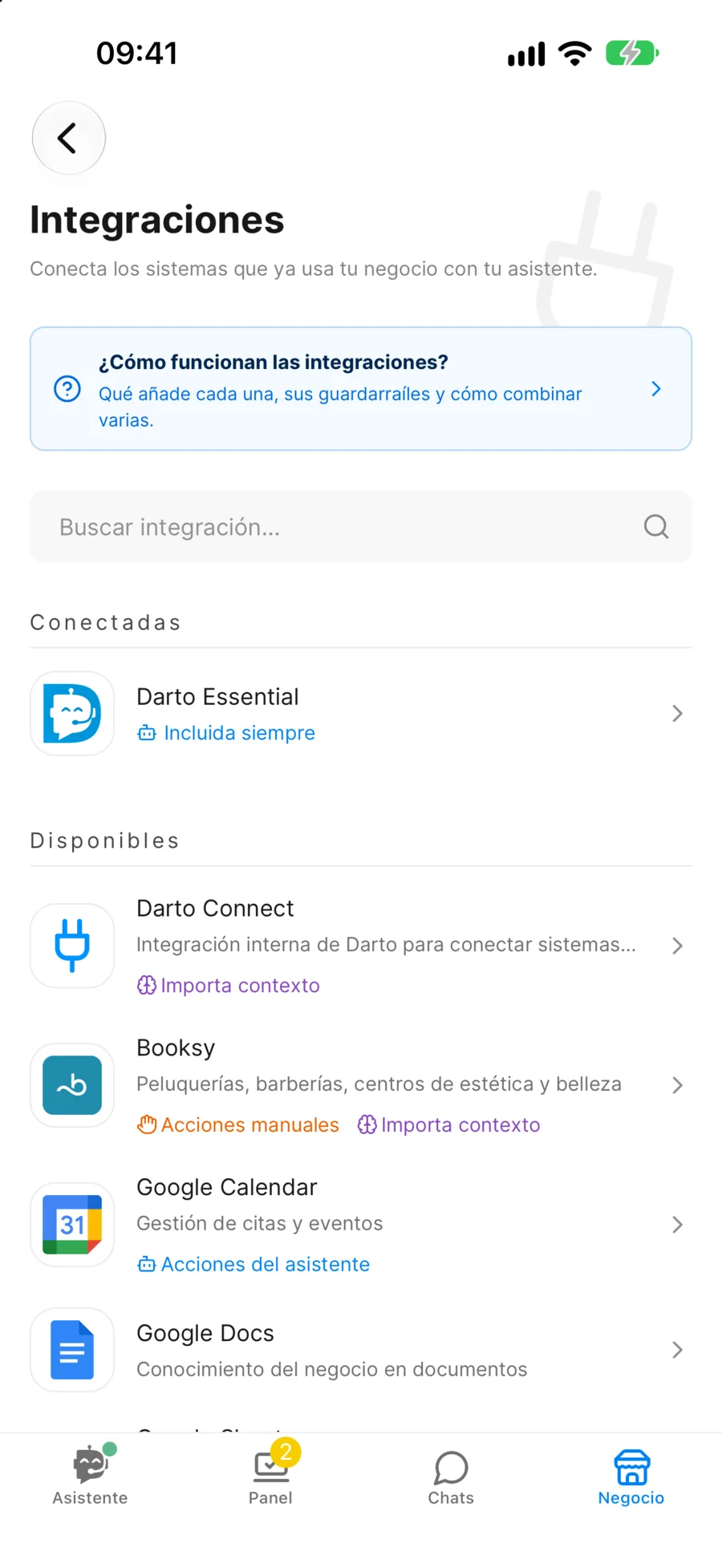
Connect your system and let Darto handle it

Connect one of the available integrations to unlock the full power of automation. Each integration adds new capabilities to your assistant:

Tailored flows

Darto adds ready-made conversation flows for that integration, ready to use. How flows work →

Actions in your system

Some integrations let Darto act directly on your software: check availability, create or change bookings, and more. How tools work →

Don't use any?

Darto works just as well without an integration: it answers with the knowledge you set up, by hand or automatically.

Your system isn't on the list? Request an integration

BooksyBooksy
PlaytomicPlaytomic
ShopifyShopify
Google CalendarGoogle Calendar
BooksyBooksy
PlaytomicPlaytomic
ShopifyShopify
Google CalendarGoogle Calendar
Booksy
Connected to Booksy
Additional tools unlocked
Knowledge
Context
FAQs
Services
Workers
Extracted automatically from integration
Tools
Queries
Get business information
Check availability
Query information in real time.
Actions
Create reservation
Cancel reservation
Modify reservation
Assistant configuration
Context
"Hair salon in downtown Madrid, 3 professionals..."
Tone
"Use lots of emojis and be very cheerful 🎉"
Temporary info
"20% off haircuts this month with code SUMMER"
FAQs
"Do you accept cards? — Yes, all cards"
Vocabulary
"Fade = degradado, Classic cut = tijera"
Alerts
"Heads up! No parking at the door"
By hand · You define it

The more knowledge, the better the answers

You decide exactly what the assistant knows: its tone, FAQs, promotions, alerts… You set it up by hand and keep full control of every reply.

Define the assistant's tone and personality

Add FAQs, promotions and temporary info

Configure alerts and special situations

Automatic · Without writing a thing

Don't want to write it all? Let it fill itself in

Darto can set up the assistant for you, without you filling in anything by hand. Two ways:

From your website

Beta

Paste your site's URL and Darto crawls all of it (every section and page) and configures the assistant with everything it learns about your business.

From your integrations

When you connect your integrations, Darto imports your business information straight into the assistant.

Either way, suggestions come in as a draft: you review and publish them. Nothing reaches your customers without your OK.

How Darto fills your assistant from your website

yourbusiness.com
Analyzing your site…
Assistant configuration
Tone & personality
Services
FAQs
Business details
0h
time saved this month

by our users

0
conversations managed

last week

0
satisfied customers

served automatically

Powered by the best AIs on the market

OpenAI OpenAI
Anthropic Anthropic
Google AI Google AI
xAI xAI

Multi-provider with automatic fallback for maximum reliability

Ready to automate your customer service?

Get started in minutes. No commitment. Cancel anytime.

No commitment
Support in your language
Setup in minutes
Operated from mobile (iOS and Android). Web version coming soon.